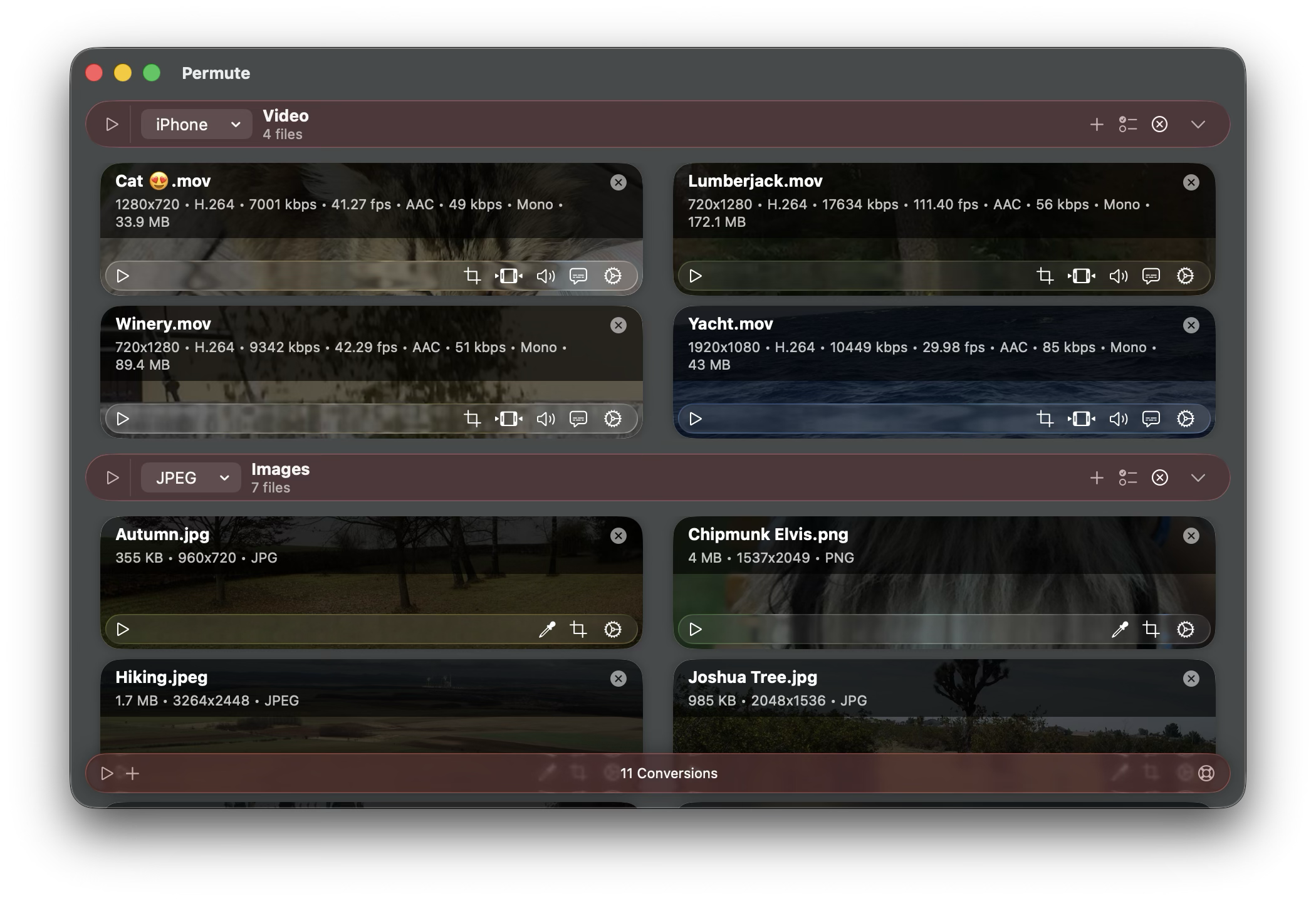
After years of planning (seriously, this has been worked on in my head for several years now) and many months of development, a beta version of Permute 4 is ready.
It is still an early beta (as of now) and even though it’s been tested during development, let it be stressed out that it’s an early beta meaning that it can be unstable in some workflows. As with any beta software, there can be bugs and you can run into various issues.
You can use this version alongside Permute 3. Permute 4 introduces PermuteKit which is an internal component that stores all internal data (presets, basic settings, etc.) within a group container, meaning that it does not alter (almost any) Permute 3 data (even if you’re running Setapp version) and all distribution channels will share the same data.
Requirements
macOS 26 and Apple Silicon. As noted in the sneak peek blog post, Intel is now the thing of the past and due to major UI changes in macOS 26, there are no plans to support previous OS versions. Permute 3 still works fine on these OS versions.
Sending Feedback
Please send feedback only using the in-app support dialog using the Support button in the app (bottom-right corner or via the Help menu in the menu bar), or using the Report Issue button in case the conversion fails. As we expect a lot of reports (at least initially), it is really important for us to keep the issues sorted properly in order to keep track of everything.
If possible, try not to make a long list of ideas, rather submit individual suggestions/bug reports separately as that allows streamlined discussion about the issue and better issue tracking.
If you run into issues, please try to describe them – include information about the input file, the preset that you’re using and include steps that lead to the issue reported. Try to avoid phrases like “doesn’t work” – these can mean anything – each issue manifests itself in some way, e.g. via an error message, etc. – please try to describe the unexpected behavior.
Removed Features
It is not really correct to call these features removed, they just weren’t re-implemented in Permute 4 as they were deemed as not used enough or obsolete. It is never an easy choice to remove a feature, but everything has been re-visited and some features no longer seemed like a good fit looking forward – Permute 3 has been around for 8 years and Permute 4 is likely to have a similar life span.
- ⛔️ AppleScript support has been removed. There are currently no plans to bring this back. If your workflow depends on this, please contact us and describe the workflow where AppleScript support would be useful, perhaps there are better alternatives.
- ⛔️ DVD preset is no longer available. There are no plans to address this, if you need to author DVDs, please keep using Permute 3.
- ⛔️ Older devices from iPhone/iPad presets as well as the whole iPod preset were removed. This allows for a single preset that can handle the entire set of devices released in the past 10 years or so. If your workflow relies on support for these older devices, please contact us, they could be brought back in some form, but they are scarcely used.
- ⛔️ “Web Optimization” module has been removed. It is a commonly misunderstood module and running the file via MP4 preset does the same job.
- ⛔️ History feature has been removed. It has been very scarcely used, took up disk space, …
Known Issues
There’s a few known issues that we’re aware of and will be addressed in future beta builds.
- ⛓️💥 Missing localizations. As the app was re-built from the ground up, localizations are incomplete. We’ve tried to merge the existing ones in, but there will be a lot of missing phrases nonetheless.
As the app is still in active development, some phrases are likely to change during beta testing. Please do not send reports about this for the time being. In case you’re interested in helping out with the localization for your language, please send us a report indicating which language are you interested in updating and we’ll contact you when the beta gets more stable.As of Beta 8, we’re accepting localization requests. ⛓️💥 Potential accessibility issues – there may be some sections of the app that are not properly labeled for VoiceOver. Please report such places.Accessibility has been reviewed by multiple VoiceOver users and was refined over the initial few betas.⛓️💥 Eney integration is not yet available (Setapp builds).(added in beta 2)⛓️💥 The icon is still Permute 3 icon. A graphic designer is working on a new icon to match the liquid glass aesthetic, but it is not ready yet.(added in March).⛓️💥 Downie does not integrate with Permute 4 yet. This might take a while as it will require Permute 4 to stabilize first.
Upgrade Pricing
Permute 4 will be released on May 26. All 2026 purchases will receive a free upgrade. All previous purchases will be entitled to 40% off.
Notes: Setapp users will, of course, receive the upgrade free of charge as part of their subscription.
What’s new?
Heh, shouldn’t this be at the very top? 🙂
- ✅ completely new UI
- ✅ reworked trim and crop with waveform for audio, pixel rulers for video and images
- ✅ splitting files according to CUE/EDL/JSON now offers adjustments as well as custom chapter splitting
- ✅ drop zones – predefine conversions with presets or custom groups and automatically convert files by dropping them on the drop zone
- ✅ MP4 preset now has a switch between HEVC and H.264 video formats for easier setup.
- ✅ greatly improved Text preset (converting images into text)
- ✅ ProRes preset now uses hardware acceleration
- ✅ you can now drag & drop subtitles and audio files onto video files in Permute to add them to the file
- ✅ low power mode to run conversions in the background using less power (though taking longer)
- ✅ MP4 and HEVC presets have an “Automatic Setup” options for small files, best quality, etc.
- ✅ you can now trim and stitch files in one step
- ✅ Workshop is now part of the main workflow:
- ⦿ you can now add PDF files directly into the queue and apply presets (PDF Filter, PDF to Images, etc.) that you can set up in Settings > Presets
- ⦿ to create a video from audio and an image, add either the image or the audio into the queue and select the option under the Actions menu to combine it with audio or image. You can also apply this to the entire group, allowing for setting an image to all audio files within the group at once.
- ⦿ to replace color, use the Color Replacement preset or in case of images, adjust color replacement directly on the image file
- ⦿ use the Actions menu to split files by chapters/EDL/CUE/JSON files
- ⦿ HLS Stream is now a standalone preset that you can configure in Settings and apply to any video
- ⦿ IP Camera files are now immediately fixed when opened
- ⦿ brand new metadata editor, supporting more formats, more tags, etc.
- ⦿ multi-preset has now been replaced with drop zones
- ⦿ text files can be also added directly into the queue and text-based presets (encoding, text to speech) are available and can be applied to them
- ⦿ you can now export tracks from files via the Actions menu
- ⦿ Video to Images is now a preset that you can apply to any conversion group with videos
How to start testing?
If you use Setapp, enable beta builds in Setapp’s Settings > Updates. Unfortunately, due to some technical difficulties, Setapp users need to download the external version as well for the beta testing. After beta testing period is over and the app is officially released, they will need to remove the external version and install via Setapp.
Download a beta from this link:
⬇️ https://software.charliemonroe.net/trial/permute/v4/latest/
Enjoy!
How to stop testing?
If you no longer wish to test Permute 4 and want to go back to Permute 3, just use Permute 3 – it still should be on your system.




exciting news
can you consider a free upgrade for those like myself you just purchased 3 for the first time pls – a cut off window is probably farest
thanks
Hi, most likely, 2026 purchases will receive a free upgrade. It all depends on the actual release date.
I bought it on November 6, 2025, and I also hope to get a free upgrade to version 4.
A very user-friendly plan would be: free upgrades to version 4 within half a year, and discounted upgrades for those who have owned version 3 for more than half a year.
I’m currently testing the beta version~
While I truly understand this, Permute is not really an app that you *need* to upgrade – Permute 3 will keep on working without any issues for years to come.
Hi
Tried it once and saw or missed that it was not possible to toggle subtitles all together
Please see the blog post – I specifically highlighted: Please send feedback only using the in-app support dialog using the Support button in the app (bottom-right corner or via the Help menu in the menu bar), or using the Report Issue button in case the conversion fails. As we expect a lot of reports (at least initially), it is really important for us to keep the issues sorted properly in order to keep track of everything.
As I don’t know what you mean by this, I cannot help. Please submit the request through proper channels. Thank you.
Awesome news, but I recently purchase this software like a month ago. Would be awsome if we have a free upgrade since if I knew this was going to happen would have purchased the new one 🙁
In 99% likelihood all 2026 purchases will be able to upgrade for free.
Congrats on this beta release! Looking forward to trying it out. Been a believer in your work for years now and know how much you have worked on this.